DeepSwapAI · Image tools
Photo to Coloring Page
Create a coloring-page draft from a photo. Control the level of detail and line weight, then inspect the outlines before printing or coloring digitally.
Explore the controls and preview your uploaded photo free, with no sign-up. AI generation requires a verified account and 8 credits. This is not a free generated sample.
Explore free — no sign-upChoose your look
8 credits01Upload a photo
Use photos you own or have permission to edit.
02Choose your look
Sign in to generate; controls and local photo preview are free.
03Your result
Your generated image will appear here.
AI can change fine details. Review faces, edges and text before sharing.
Produces a raster line-art draft, not an editable vector or guaranteed print-ready template. You may need to clean up lines or adjust print scaling.
See a real before-and-after example
This example uses DeepSwapAI's public brand image, not a customer's photo. It is one completed generation, not a quality benchmark or a promise of the same result.
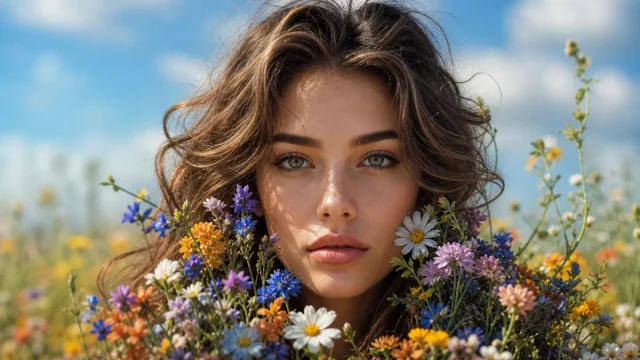
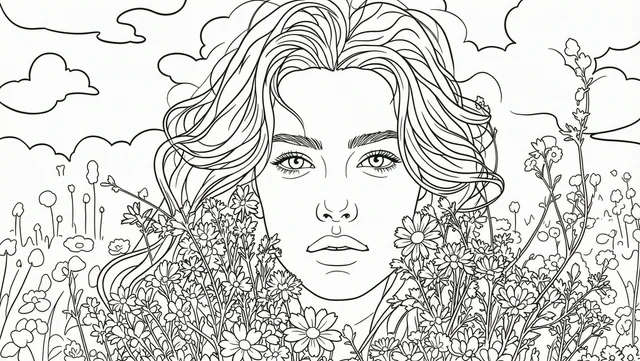
Only the two selectors change. Upload your own permitted photo and click Generate when ready; this button does not submit a task or spend credits.
Choose a useful starting photo
- For family, pet or classroom activities, choose a clear subject against a simple background. Use only photos you have permission to edit.
- Try simple detail and bold lines for larger coloring areas, or more detail for a denser drawing. Check for broken or confusing outlines.
- Download the PNG, preview it and adjust the scale in your print dialog. No PDF, vector file, fixed paper size or print-quality guarantee is included.
How it works
- Upload a photo with a clear subject and an uncluttered composition.
- Choose detail and line weight; simpler settings leave larger coloring areas.
- Generate, inspect the outlines and white areas, then download and adjust print scaling.
8 credits per generated image. One-time credit purchases; no subscription. Future images are without a watermark after a purchase.
Uploaded files and generated images are scheduled for deletion after 24 hours. Download your result before then.
Questions before you start
Can it make a page from only a written idea?
This version needs an uploaded photo. It converts the photo into a line-art draft rather than generating a new scene from text.
Is the result ready for every printer?
No. Review incomplete outlines and unwanted shading first. Printer margins, paper size and scaling may require adjustment. The download is a raster PNG, not a vector file.