DeepSwapAI · Image tools
AI Background Generator
Give a portrait or product photo a different setting without starting from a blank canvas. Pick a scene and lighting, then review the subject edges and shadows in the result.
Explore the controls and preview your uploaded photo free, with no sign-up. AI generation requires a verified account and 8 credits. This is not a free generated sample.
Explore free — no sign-upChoose your look
8 credits01Upload a photo
Use photos you own or have permission to edit.
02Choose your look
Sign in to generate; controls and local photo preview are free.
03Your result
Your generated image will appear here.
AI can change fine details. Review faces, edges and text before sharing.
Edits an uploaded photo, not a blank background. The output is a complete PNG image, not a transparent cutout. AI may alter small subject details.
See a real before-and-after example
This example uses DeepSwapAI's public brand image, not a customer's photo. It is one completed generation, not a quality benchmark or a promise of the same result.
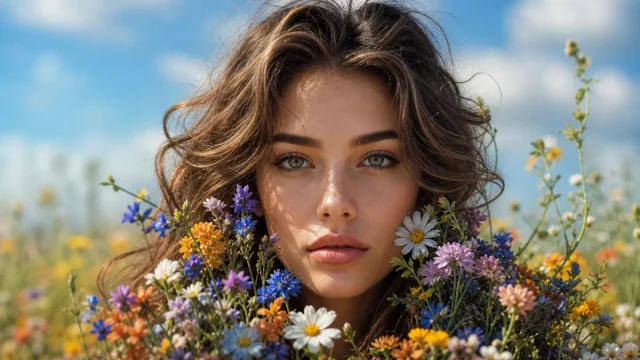
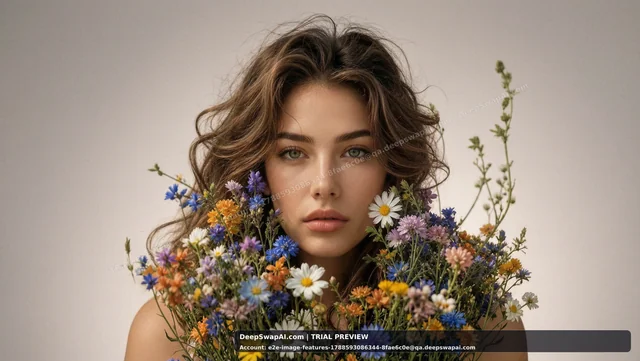
Only the two selectors change. Upload your own permitted photo and click Generate when ready; this button does not submit a task or spend credits.
Choose a useful starting photo
- For a product listing, show the whole item clearly; try a studio scene and soft light. Check logos, labels and edges after generation.
- For portraits or social images, leave space around the subject. Use extra instructions for the desired scene without requesting changes to the person.
- Start with one clear subject and avoid heavy blur. This creates a complete image, not a transparent cutout or a batch of product photos.
How it works
- Upload a clear photo with the full subject visible.
- Choose a background and lighting; optionally describe a refinement.
- Generate, inspect the subject edges and shadows, then download.
8 credits per generated image. One-time credit purchases; no subscription. Future images are without a watermark after a purchase.
Uploaded files and generated images are scheduled for deletion after 24 hours. Download your result before then.
Questions before you start
Does it remove the background to transparency?
No. This tool creates a new scene around the uploaded subject. It returns a complete PNG image, not a transparent cutout.
Will the subject stay exactly unchanged?
The edit instructions ask the model to retain the subject, but fine details can change. Inspect hair, product labels, edges and shadows before using the image.