İnceleyebileceğiniz AI yüz değiştirme öncesi ve sonrası örnekleri
Her yüz değiştirme iş akışından gerçek birer işlemi, etiketli bir hedef-referans-sonuç iş akışını, eşlenmiş bir grup fotoğrafı iş akışını, iki kimlik yönünü ve tekrarlanabilir bir kodu çözülmüş piksel denetimini inceleyin. Her örnek, görünür kaynak bilgisi ve neyi kanıtlayabileceğine dair net bir sınır içerir.
DeepSwapAI Ürün Ekibi tarafındanGerçek çıktı çalıştırmaları 27 Eylül 2026'da eklendi; piksel denetimi 27 Temmuz 2026'da incelendiResmi gösterimler
Kanıt açıklaması
Bu görüntülerin ne olduğu ve ne olmadığı
Yararlı bir örnek sayfası, kaynağı ve sınırlamaları görüntüler kadar görünür kılmalıdır. Bu varlıklar, amaçlanan kimlik-ve-sahne ilişkisini, gösterimi desteklenmeyen bir performans iddiasına dönüştürmeden açıklar.
01
Resmi gösterim varlıkları
Görsellerden altısı DeepSwapAI gösterimleridir: bir tek fotoğraf hedef-referans-sonuç bileşimi, bir eşlenmiş grup fotoğrafı bileşimi, iki stüdyo kimlik referansı ve mevcut ürün deneyiminde kullanılan iki sahne yönü. Gerçek çıktılar bölümü, her yüz değiştirme iş akışından tamamlanmış birer işlem ekler.
02
Topluluk yüklemeleri değil
Bu sayfadaki hiçbir görsel bir müşteri sonucu, kullanıcı gönderimi veya müşteri yorumu değildir. Aşağıdaki gerçek çıktılar, yapay zeka ile oluşturulmuş tanıtım görselleri üzerinde kendi yaptığımız işlemlerden gelir.
03
Uydurulmuş kıyaslama değil
Örnekler bir doğruluk puanı, ortalama kalite, oluşturma hızı, başarı oranı veya garantili sonuç oluşturmaz.
04
Görünür kanıtı incele
Kimlik işaretlerini, saç sınırlarını, yüz ışığını, ön plan örtüşmesini ve sahne detayını karşılaştır. Ardından ölçeklendirmeden önce kendi temsili girdini test et.
Görüntü hakları ve yeniden kullanım. DeepSwapAI veya lisans verenleri, bu resmi gösterim varlıklarında geçerli tüm hakları saklı tutar. Bu sayfayı görüntülemek, bunları yeniden yayınlama, yeniden dağıtma, yeniden satma veya ticari olarak kullanma izni vermez. Yazılı lisans veya atıf koşulları talep etmek için resmi iletişim sayfasını kullanın.
Gerçek çıktılar
Her yüz değiştirme iş akışından tamamlanmış birer işlem
Her iş akışının 27 Eylül 2026'da canlı ürün üzerinden tamamlanan tek bir işlemi aşağıda gösterilmektedir; grup iş akışı, notunda açıklandığı gibi bir ürün düzeltmesinin ardından ikinci kez çalıştırıldı. Tüm girdiler yapay zeka ile oluşturulmuş DeepSwapAI tanıtım görselleridir; bu nedenle hiçbir müşteri yüklemesi, stok fotoğraf veya gerçek kişi söz konusu değildir. Hesabın ücretli erişimi olduğu için deneme filigranı görünmez ve sonuçlar rötuşsuz gösterilir.
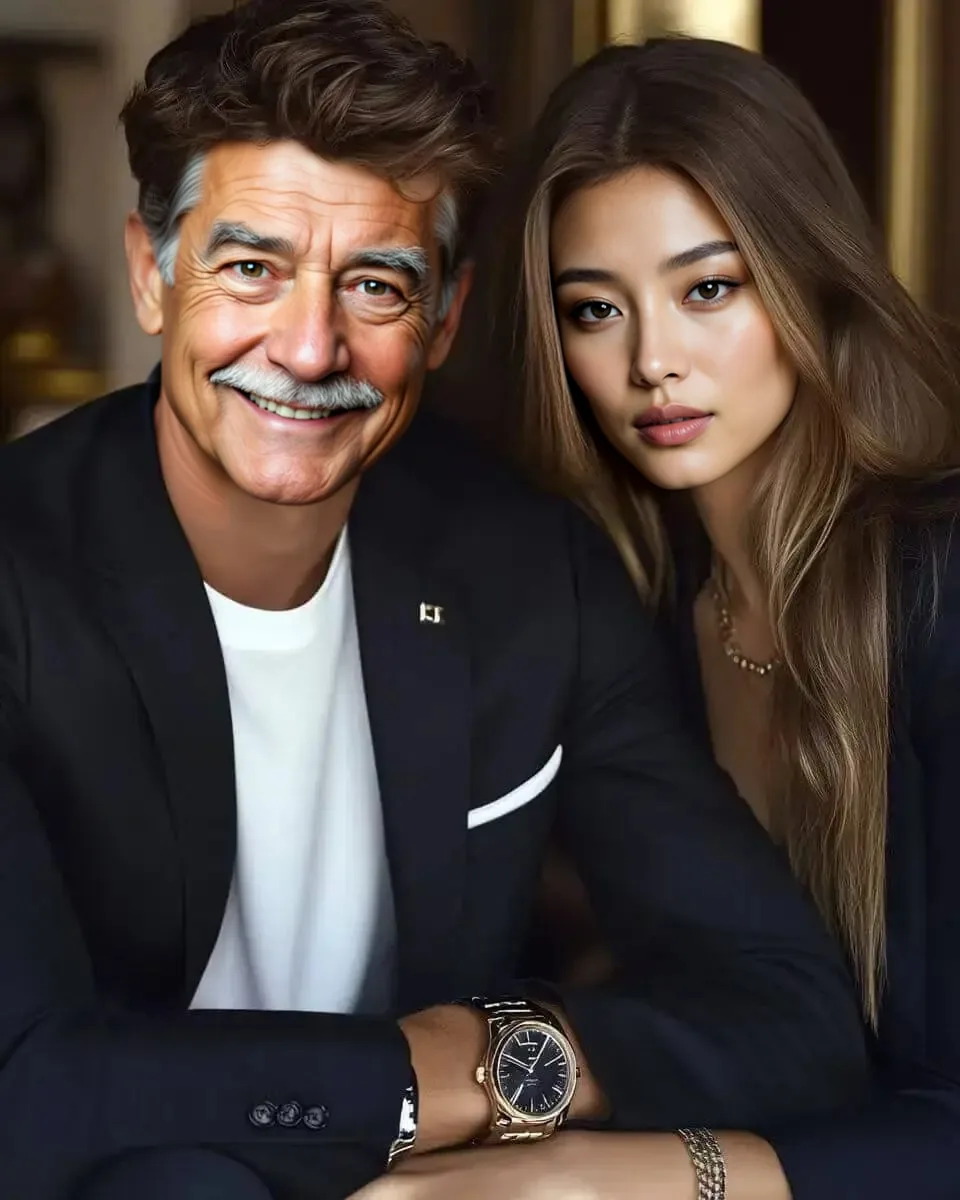
Yüz fotoğrafı 1 erkeğe, yüz fotoğrafı 2 kadına eşlendi. İlk işlemde iki yüz alanının birleştiği yerde sert bir kırpma kenarı görüldü; grup iş akışı artık her yüzü fotoğrafla harmanlıyor ve bu, o düzeltmeden sonra yapılan işlemdir.
Sitede görselden videoya dönüştürme aracı olmadığından hedef klip, yapay zeka ile oluşturulmuş durağan bir görsele doğru yavaş bir kamera yaklaşmasıdır. Doğal hareketi değil, hareketli karelerdeki yüz değiştirmeyi gösterir.
Hedef GIF, yapay zeka ile oluşturulmuş durağan bir görsel üzerinde yavaş bir yakınlaştırmadır. Her iki animasyon da burada GIF dosyalarının daha hafif web kopyaları olarak gösterilir.
Web kopyaları yeniden boyutlandırılmış ve yeniden kodlanmıştır. İş akışı başına tek bir işlem yalnızca bir örnektir; bir doğruluk puanı veya kendi fotoğrafınız için bir garanti değildir.
Hangi görüntünün sahneyi ve hangisinin kimliği sağladığını görün
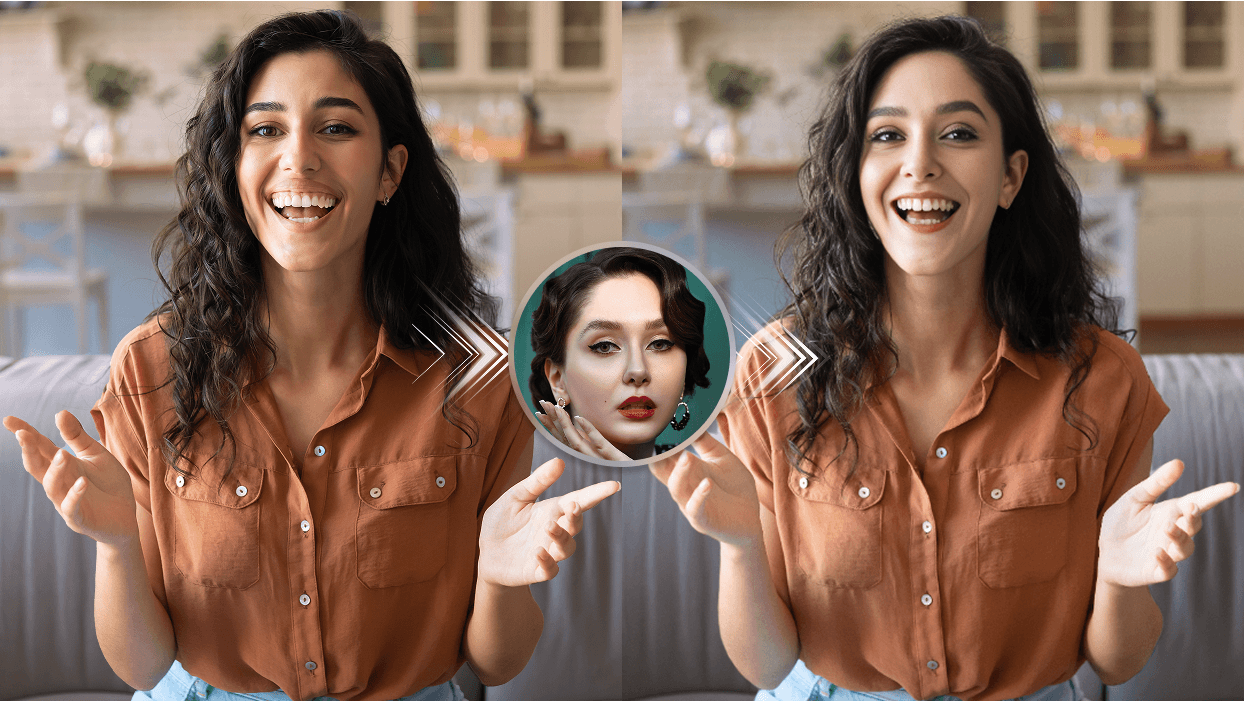
Hedef görüntü, vücudu, saçı, pozu, aydınlatmayı ve arka planı belirler. Kimlik referansı, o sahneye yerleştirilecek yüz ipuçlarını sağlar. Etiketli sonuç paneli, kendi medyanızı test etmeden önce bu girdi ilişkisini görünür kılar.
Hedef: sahneyi, pozu, saçı, kıyafeti, ışığı ve tutarlı kalması gereken yüz açısını inceleyin.
Kimlik referansı: görünen gözleri, kaşları, burnu, ağzı, çeneyi ve yaş ipuçlarını karşılaştırın.
Açıklayıcı sonuç: yüz kimliğini kenarlar, ışık ve sahne bütünlüğünden ayrı olarak değerlendirin.
Resmi açıklayıcı hedef-referans-sonuç bileşimi. Fotoğraf iş akışını açıklar ve bir müşteri sonucu, canlı oluşturma kaydı veya kontrollü performans kıyaslaması olarak sunulmaz.
Tekrarlanabilir öncesi-sonrası denetimi
Açıklamayı bir ürün kıyaslamasına dönüştürmeden ölçün
Kaynak açıklama, 622 x 701'lik bir hedef panel ve 622 x 701'lik bir açıklayıcı-sonuç paneline bölünmüştür. Üç hizalanmış bölge, merkezi kimlik-referans portresi ve ok katmanlarından arınmış kalır. Tablo, yerel çözünürlükte çözülmüş piksel farklılıklarını rapor eder; yüzü puanlamaz, bir oluşturma görevi çalıştırmaz veya model kalitesini çıkarsamaz.
Resmi açıklamadaki üç hizalanmış bölge için çözülmüş piksel ölçümleri
Bölge
Hizalanmış pencere
Ortalama RGB farkı
Delta 12'nin üzerindeki pikseller
Parlaklık korelasyonu
Gradyan korelasyonu
Üst sahne ve yüz bandı
0,0 · 622 x 230
16.658
74.963%
0.93
0.378
Yüz ve saç penceresi
180,8 · 260 x 270
20.584
68.372%
0.901
0.3097
Alt konu ve sahne bandı
0,480 · 622 x 221
13.996
64.64%
0.9319
0.4188
Üst sahne ve yüz bandı
Üst bant, referans-dairesi ve ok katmanlarının üzerinde kalırken hizalanmış mutfak sahnesini, saçı ve yüzü içerir.
Hedef (0, 0, 622, 230); sonuç (622, 0, 622, 230)
Yüz ve saç penceresi
Merkez pencere, referans-dairesi veya ok katmanlarını dahil etmeden görünür yüzü ve çevreleyen saçı izole eder.
Hedef (180, 8, 260, 270); sonuç (802, 8, 260, 270)
Alt konu ve sahne bandı
Alt bant, referans-dairesi ve ok katmanlarının altında kıyafet, kollar, eller ve oda detayını içerir.
Hedef (0, 480, 622, 221); sonuç (622, 480, 622, 221)
Rakamların ortaya koyduğu: kesin ölçümleri kaynak SHA-256'ya bağlarlar 14b8ca68bbf2e692b3f499084afffbd25e05373b00aa25c3f8d868876c25b8da. Ayrıca görsel olarak ilişkili bir çiftin yalnızca yüz piksellerinin değiştiğinin kanıtı olmadığını gösterirler. Piksel farklılıkları saç, kıyafet, eller, vücut, aydınlatma, sıkıştırma ve sahne detayını içerebilir.
Tam denetim kaydını indirin
JSON, kaynak parmak izini, panel düzenini, formülleri, tam bölge koordinatlarını, ölçümleri, hak sınırını ve sınırlamaları içerir. CSV, tablo analizini destekler ve BibTeX sabit bir alıntı sağlar.
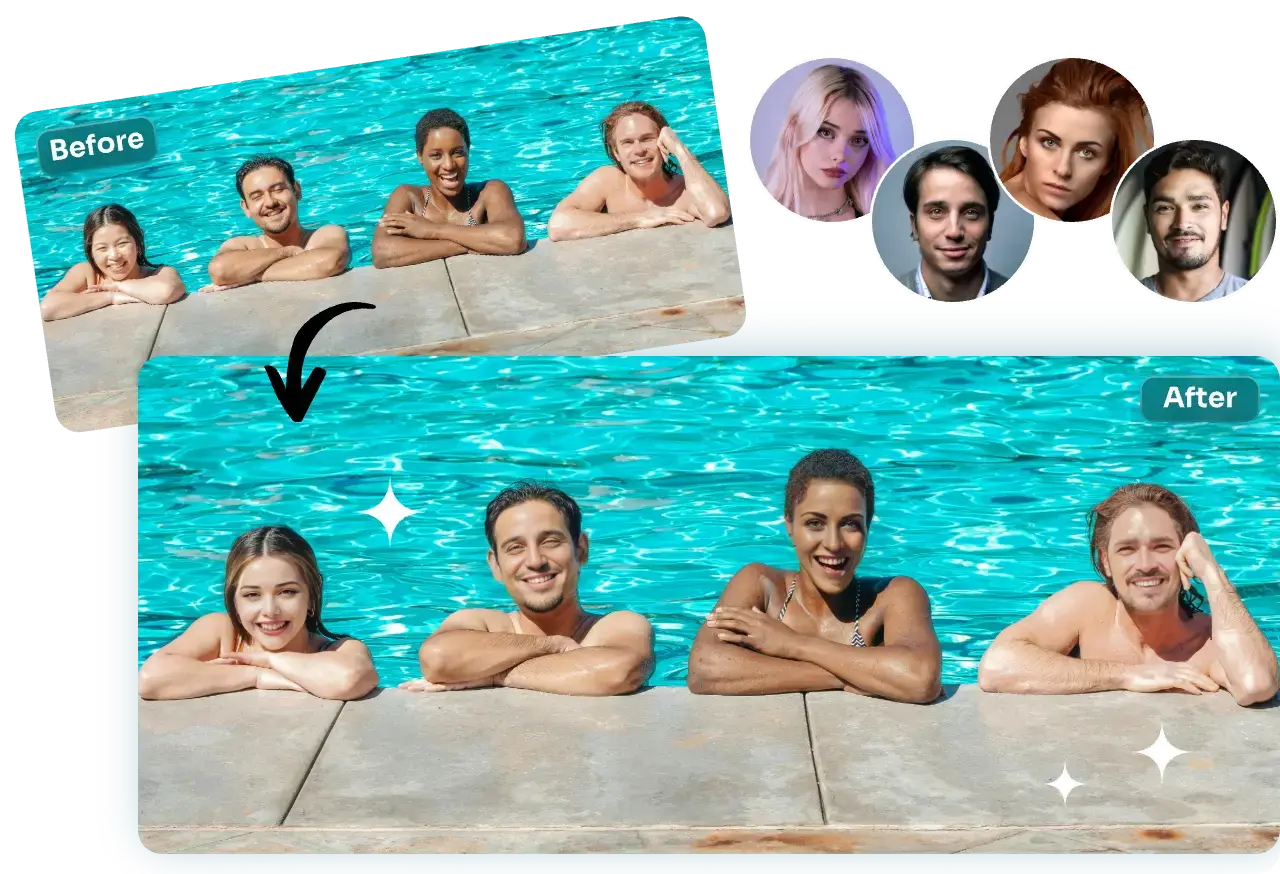
önce kişileri algılar ve gönderimden önce numaralandırılmış referans-hedef eşlemesini görüntüler. Bir hedef grup:
fotoğraf kişileri, pozu, havuz sahnesini, aydınlatmayı, saçı, kıyafeti ve arka planı sağlar. Ayrı kimlik referansları:
seçilen her kişi, tüm grup için tek bir referans ima edilmek yerine ayrı bir referans alır. Kanıt sınırı:
bu, bir kullanıcı yüklemesi, görev makbuzu, ortalama kalite örneği veya başka bir görsel için garanti değil, resmi bir açıklayıcı bileşimdir. Grup-fotoğraf hazırlık kılavuzunu kullanarak görünürlüğü, aralığı, numaralandırılmış sırayı, 10-referans sınırını ve seçilen yüz başına mevcut 6-kredi maliyetini kontrol edin.
Resmi açıklayıcı grup-fotoğraf bileşimi. Dört referanslı bir eşleme yönünü açıklar ve bir müşteri sonucu, canlı oluşturma kaydı veya kontrollü performans kıyaslaması olarak sunulmaz.
Kimlik yönü A
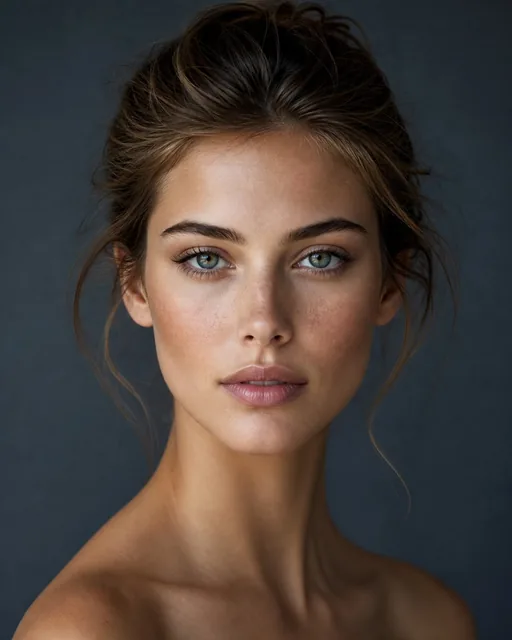
Detaylı bir dış mekan sahnesinde yeşil gözler ve belirgin bir kaş
Stüdyo portresi görünür kimlik ipuçlarını sağlar. Sahne yönü, dağınık saçlar, alt yüzü geçen çiçekler, parlak gökyüzü ve benekli ışık arasında ilişkili bir yüz kimliği yerleştirir.
Kimlik referansı
Karşılaştırma bağlantı noktaları olarak gözleri, kaş çizgisini, burnu, ağzı, çeneyi ve genel yaş ipuçlarını kullanın.
Kimlik: göz rengini, kaş ağırlığını, dudak şeklini ve çene oranlarını karşılaştırın.
Kenarlar: saç çizgisini, yanak sınırını ve çenenin yakınındaki çiçekleri inceleyin.
Işık: vurguların ve gölge yönünün sahne içinde tutarlı kalıp kalmadığını kontrol edin.
Resmi açıklayıcı sahne yönü. Görsel inceleme için referansla eşleştirilmiştir, bir kullanıcı sonucu veya kontrollü öncesi-sonrası testi olarak iddia edilmez.
Kimlik yönü B
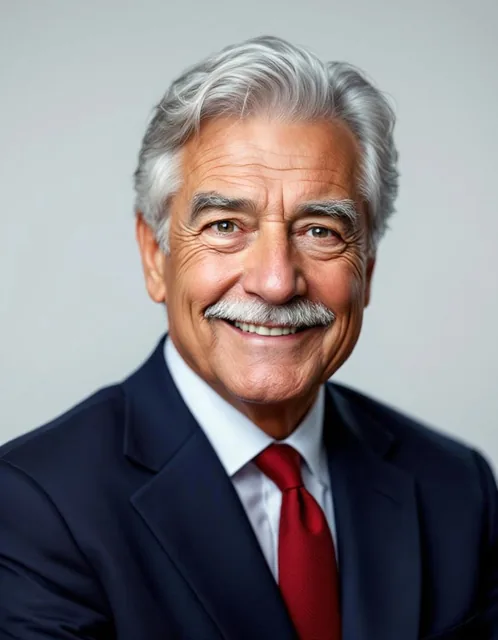
Aynı görsel dilde kahverengi gözler ve daha yumuşak yüz hatları
İkinci stüdyo portresi farklı bir dizi kimlik ipucu sağlar. İlgili sahne yönü, izleyicilerin yüz kimliğine odaklanmasını ve onu tamamen farklı bir ortamla karıştırmamasını sağlamak için aynı çiçek tarlası dilini kullanır.
Kimlik referansı
Göz şeklini, kaş kavisini, burnu, ağzı, çene konturunu ve genel yüz oranlarını karşılaştırın.
Kimlik: gözleri, kaş kavisini, ağız köşelerini ve çene şeklini karşılaştırın.
Ön plan: yoğun çiçeklerin alt yüzü ve boynu nasıl kapladığını inceleyin.
Sahne: parlak gökyüzü ve güneşli tarlaya karşı cilt aydınlatmasını değerlendirin.
Resmi açıklayıcı sahne yönü. Şeffaf bir görsel incelemeyi destekler; ortalama bir sonucu, bir müşteri yüklemesini veya canlı-görev kaydını temsil etmez.
Kullanım Kılavuzu
Örneklerin cevaplayabildiği sorular
Test planı oluşturmak için görselleri kullanın, yayınlanmamış kanıtları çıkarmak için değil.
Soru
Burada ne görünüyor
Sınır
Kimlik ipuçlarını karşılaştırabilir miyim?
Evet. Referans ve sahne yönü gözleri, kaşları, burnu, ağzı, çeneyi ve yaş ipuçlarını ortaya çıkarır.
Bu biyometrik bir benzerlik puanı değil, algısal bir incelemedir.
Evet. Fotoğraf iş akışı bileşimi, sahne hedefini, kimlik referansını ve açıklayıcı sonucu etiketler.
Girdi rollerini açıklar ancak kontrollü bir öncesi-sonrası kıyaslaması değildir.
Video veya GIF sürekliliğini değerlendirebilir miyim?
Gösterimlerden hayır; bunlar statiktir. Yukarıdaki video ve GIF işlemleri, yapay zeka ile oluşturulmuş durağan bir görsel üzerinde yavaş kamera hareketleridir; bu nedenle yüz değiştirmeyi hareketli karelerde gösterir, ancak doğal hareketi, kafa dönüşlerini, tıkanmayı veya kesmeleri göstermez.
İlgili hareket iş akışında test dönüşlerini, bulanıklığı, tıkanmayı, kesmeleri ve döngü dikişlerini inceleyin.
Çıktımı veya hızımı tahmin edebilir miyim?
Hayır. Sonuçlar, sağlanan kimlik referansına ve hedef medyaya göre değişir.
Ölçeklendirmeden önce temsili bir görsel veya kısa bir klip çalıştırın ve gerçek sonucu inceleyin.
Örnekten teste
Kendi medyanızda aynı inceleme sırasını kullanın
Net bir kimlik referansı seçin. Yüzü keskin, engelsiz ve incelemeye yetecek kadar büyük tutun.
Temsili bir hedef seçin. Nihai kullanım için önemli olan pozu, aydınlatmayı, saçı, aksesuarları veya tıkanmayı dahil edin.
En küçük kullanışlı testi oluşturun. Tam bir toplu işlem veya uzun bir klip yerine tek bir fotoğraf veya kısa bir zorlu bölümle başlayın.
Kimlik ve sahneyi ayrı ayrı inceleyin. Önce yüz hatlarını, ardından saçı, kenarları, ışığı, elleri, ön plan nesnelerini ve arka plan sürekliliğini kontrol edin.
İzni ve tam deneme görselini kontrol edin. Bu görseli paylaşmadan önce onayı teyit edin ve eksiksiz e-posta deneme görseli filigran bildirimini inceleyin.